Household Budget
Times are tough for many Americans. Fluxuations in the economy make it difficult for most to feel they have financial stability. The key to that stability is literally getting your financial house in order. One of the best ways to do so is by utilizing a monthly budget planning spreadsheet Excel template. This template can help determine where you are financially and help you get to where you would like to be.
Using the Monthly Budget Planning Spreadsheet Excel Template
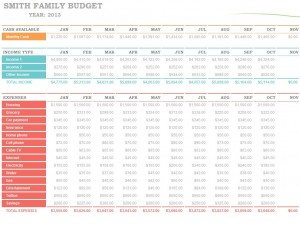
This monthly budget planning spreadsheet Excel template can help even the most unorganized people get things under control. The top of the spreadsheet is dedicated to your household income. The income is broken down by wages, interest/dividends and miscellaneous. This will be the foundation for the remainder of the spreadsheet.
Once your income information has been added, it’s time to move on to the Expenses portion of the spreadsheet. The main Expenses categories include Home, Daily Living, Transportation, Entertainment, Health, Vacations, Recreation, Dues/Subscriptions, Personal, Financial Obligations and Miscellaneous Payments.
Within each category is a collection of subcategories. For example, included in Daily Living are groceries, child care, dry cleaning, dining out, housecleaning service and dog walker. Simply input the amount you spend on the subcategory into the spreadsheet and repeat the process for every subcategory.
Perhaps the best thing about this monthly budget planning spreadsheet Excel template is that it’s also a calculator. You won’t have to worry about trying to do math by hand or with an extra calculator because all of the numbers will be clearly displayed for you.
All the subcategories will reveal a category total, and the total expenses and the amount of cash you have left over or will need will be displayed at the bottom. Guesswork when it comes to finances will be eliminated because as long as you put in the correct information, you will know exactly where every single dime you spent went during a given month.
This monthly budget planning spreadsheet Excel template is just one of dozens of sheets, templates and calculators designed to help you regain control of your finances. In that spirit, these helpful tools are also completely complimentary.
Download: Monthly Budget Planning Spreadsheet Excel Template
Constructing a monthly budget is something many people would simply rather not do. Marking down and laying out where all your money is going can be a frustrating and excruciatingly time-consuming process. However, creating a budget is one of the building blocks of a strong financial foundation. The monthly budget planning Excel template available on this site can do the bulk of the work for you.
The template serves as a calculator and will reveal all the important financial figures once the information has been input. This instantly downloadable template is available for free right here.
Using the Monthly Budget Planning Excel Template
The monthly budget planning Excel template available on this site is among the most comprehensive available on the internet today. Cent-by-cent, you will be able to see where all your money is going. The first box on the template is reserved for your projected monthly income. Just below is a similar box for actual monthly income. To the right is the projected balance minus expenses, the actual balance minus expenses and the difference. This will serve as your financial foundation to work from.
There are 12 major categories for monthly expenses. The categories are:
- Housing
- Entertainment
- Transportation
- Loans
- Insurance
- Taxes
- Food
- Savings or Investments
- Pets
- Gifts and Donations
- Personal Care
- Legal
Next to each category in the monthly budget planning Excel template is a column for the “Projected Cost,” the “Actual Cost,” and the “Difference.” Within each category is a set of sub-categories. For instance, within the “Entertainment” category is the sub-categories video/DVD, CDs, Movies, Concerts, Sporting Events, Live Theater and Other.
You will simply put in the amount you anticipated on spending and the amount you actually spent into the sub-categories and the template will calculate the difference. Once this has been completed, the subtotals for each will appear at the bottom of the selected category.
The process of entering information will be repeated for all the categories to determine the total projected cost, the total actual cost and the total difference. The numbers may not always be what you want to see, but the monthly budget planning Excel template will always give you a better understanding of your finances and offer ways to help save money.
Download: Monthly Budget Planning Excel Template
With the economy at current levels, everyone has debt that they are trying to get rid of. The best way to stay ahead of a budget is to reduce the monthly outflow. Of course the biggest outflows to curtail are those high interest unsecured debts. If there are credit cards that you would like to get paid off sooner, this credit card Excel template can take the guess work out of figuring out how to reduce your debt.
This template is completely free and customizable. Users will find that the formulas are not locked, so that they may make adjustments to their individual situations as necessary. Simply click the link and download this credit card Excel template with the listed link, and be on the way to a quick debt reduction plan.
Using the Credit Card Excel Template
The template is easy to use, and users can be on their way to a credit card payoff plan with just a few easy steps:
- Download the free credit card Excel template from the listed link
- Review the included demo information on the template for reference before clearing
- Clear the cells that on the credit card Excel template. These are the cells that require input. All darker cells are calculations based off your input criteria
- Enter your current balance, interest rate (APR) and either minimum payment percentage or standard amount. Be sure to review your credit card agreement to find if the minimum payment is based off a percentage or a standard number like $35.00. Usually credit card companies require both. These will be listed as a percentage unless falling below the minimum.
- In the payoff goal section, enter either the desired month to pay off or the desired monthly payment. You can enter amounts in both these fields if you would like a comparison.
After all the data is input you can run a comparison on the three columns. The first column will show how long it will take to pay off the card using the minimum monthly payment. At the bottom, the total interest paid for this scenario is displayed. The second column will display that information for a set number of months and the third column will display that information for a set monthly payment.
This credit card Excel template is a great tool to begin calculating how to reduce debt and to see what effects debt reduction can accomplish for bottom line spending when compared to minimum monthly payments.
Download: Credit Card Excel Template
Although it’s a common necessity for any individual or family looking to save money, you’d be surprised how often budgeting gets overlooked.
According to the 2012 Consumer Financial Literacy Survey from the National Foundation for Credit Counseling (NFCC), nearly 56 percent of Americans have omitted making a personal budget in their finance plans.
Not surprisingly so, this study parallels a jarring increase in typical household credit card debt, with the majority of Americans saddled with nearly $15,000 in the negative.
Budgeting is arguably one of the most crucial aspects to both saving – and wisely spending – your cash. But more often than not, a budgeting venture has the tendency to lose steam a few weeks down the road. Unless you take the time to properly plan your financial stream, and from an organized vehicle, it’s likely you’ll financially fall.
But with the Biweekly Budget Excel Template from ExcelTemplate.com, that budgeting process can be contained and mapped with a single simple, easy-to-navigate vehicle.
How the Biweekly Budget Excel Template Can Organize Your Finances
With the Biweekly Budget Excel Template, users can effectively:
- Keep stringent track of all facets of your finances. This includes payday, your individual work period, utility bills, groceries, IRA and credit card/mortgage bills.
- Strategize your future financial moves. The Biweekly Budget Excel Template allows you to analyze your current financial portfolio from an overarching perspective. And with this information, you can effective map and strategize new ways to conserve cash.
- Keep track of your overall monetary input and output. The Biweekly Budget Excel Template grants users the ability to gage their bi-weekly financial stream from an overarching perspective, giving glimpse to a grander financial picture.
- The key to effective bi-weekly budgeting is thoroughness and honesty. Be sure to include every little minute expense, as insignificant as it might seem—those Starbucks lattes and theater runs can add up.
- Once you’ve outlined your complete expense list, look for unique ways to trim it down. Cutting back on costs like cable, expensive foods and alcohol can dramatically lift financial holes.
Tips for Forming an Effective Personal Budget
- The key to effective bi-weekly budgeting is thoroughness and honesty. Be sure to include every little minute expense, as insignificant as it might seem—those Starbucks lattes and theater runs can add up.
- Once you’ve outlined your complete expense list, look for unique ways to trim it down. Cutting back on costs like cable, expensive foods and alcohol can dramatically lift financial holes.
Download: Biweekly Budget Excel Template
Studies show that due to poor planning, a great deal of people continue to live check to check. If you have no interest in living check to check, you need to take your financial future into your own hands. The best way to do this is through meticulous planning and the ability to pay your bills on time and account for your debts and expenses. To make sure that you are planning accordingly, there is a bill pay calendar template available that can help you do just this.
Using the Bill Pay Calendar Template
Rather than paying large sums of money for an accountant or personal finance manager, first try this FREE bill play calendar template. You would be surprised how much simpler finance management is when you see your bills and debts plainly laid out in front of you.
By marking down the dates that you have specific items do, you are putting yourself in a much better position for success each and every month. Also, since the calendar is absolutely free, you can think of this as an investment into your personal finance, with zero overhead costs.
Since your bills change from time to time, you will also be glad to know that these calendars are fully customizable. If you have Microsoft Excel, you can customize this bill pay calendar template to your liking, so that you are able to make the most of the situation. No matter what you are looking for, you can rest assured that this calendar can cover it.
There is no reason not to pay your bills on time anymore, because you will have every bit of information presented to you in the form of this bill pay calendar template. The template lays out type of bill, details on it, method of payment, amount paid, amount owed and other circumstances.
When you want to get your hands on this bill pay calendar template, it is as simple as a visit to the web site, so that you can download the calendar that you need. Keep tabs on your bills, instead of letting them get the best of you. By making the most of your monthly bills and expenses, you are able to tackle these issues as they come along, which will allow you to keep yourself out of financial trouble. It all starts with baby steps, so consider this handy little bill pay calendar template as an excellent beginning.
Download: Bill Pay Calendar Template