For entrepreneurs that want to open up a restaurant, it’s important to have menus. Running off menus at the printers, paying for binding and lamination along with a variety of other costs can get expensive though. Of course many restaurant owners might think that making their own menus is out of the question, especially if they want to make menus that look great in addition to being functional. For those who want to save a little money by doing it themselves though, all they need is a restaurant menu template.
What a Restaurant Menu Template Does
When someone downloads the restaurant menu template available here, they are getting a basic setup to create a simple, attractive menu using Word. There’s no complicated software to buy or expensive, special printer that someone needs.
Once the menu has been downloaded, the first thing that someone should do is open it and click “Save As” to create a separate file for the new menu. Once the new menu file has been named (“dessert menu” or “drinks menu” are easy to remember and categorize) and placed in its own folder, the template owner can fill in the blanks and create a new menu. All he or she has to do is put in the item on one side and the price on the other side. The restaurant menu template does the rest of the heavy lifting on behalf of the creator.
It’s Hard to Beat Free
There are all sorts of programs and software suites out there that are geared toward restaurant owners. However, with this restaurant menu template there’s no reason to learn a completely new set of software. There’s also no reason to pay for it, since it’s a free Word template.
So whether the original file gets lost, corrupted or just destroyed an individual can just download a new one free of cost. Getting that kind of replacement from a specialty company that makes expensive software can be a great deal harder. That’s just one reason among many to download the free restaurant menu template for Microsoft Word.
The interview and hiring process can be full of stops and starts. Simply getting the prospective employee in the door and having him or her fill out the proper paperwork can be quite the tall order at times. At least one part of the process can be made easier with a job application template. This template will help you get all the information you need while also saving you time and money. This free employment application template is available for instant download below.
Filling out the Job Application Template
The first step in filling out the job application will be to have the applicant jot down his or her name, date of birth and social security number. The applicant will then answer if they are known by any aliases and if they are over the age of 18.
Next, the applicant will state if they are legally eligible to work in the United States and reveal whether they have ever committed a crime. The basic information portion comes next as the applicant will write down their address and phone number.
The “Employment Desired” section is next. Here, the applicant will say what type of position they are looking for, what type of money they are looking for and the first date they would be available to work. They will also say what hours they are after and if they are willing to work overtime.
The next section is reserved for education. The applicant will write down their highest level of education completed, whether it be High School, College, Post College, Trade, Business or Correspondence School. Also in the education section, the applicant will list other skills that are relevant to the position applied for.
The bottom of the application is reserved for references. Here, the applicant can list the names, addresses and phone numbers of three professional people who will vouch for the information they have provided.
Perhaps the best thing about this template is that there’s absolutely no limits or restrictions on the number of blank job applications you can print off.
Organizing an event with dozens of people can quickly become a disorganized mess. This is especially true when you are forced to have individuals sign up for the event. Standard pieces of paper just don’t offer the same continuity of a pre-made sign up sheet. The sign up sheet template can help you get the paperwork you need in absolutely no time at all. The template featured on this site can be downloaded instantly for free and there are no restrictions on the amount of sign up sheets you can print off.
Using the Sign Up Sheet Template
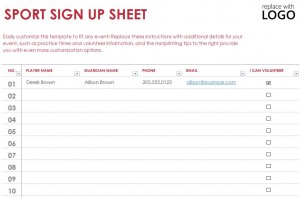
The sign up sheet template simply could not be any easier to use. The template is broken down into six easy-to-use columns. The first column is reserved for the job or activity the person or persons will perform. The next column is reserved for the name of the person or persons signing up.
Participants will then be asked to write in their address in the space next to the name column. The next space is reserved for the phone number of the person or persons who have signed up. The penultimate column reserved for the email address or addresses of those who will be involved. Finally, the last section is reserved for any notes that need to be made by any party involved in the event.
These sheets are perfect for a litany of activities. You can compile a list of volunteers for a charitable cause. You can get a group together for a work event, party or other type of function. The sheet could also be used if you are planning on setting up a recreational sports team or league.
There is enough space for over 20 people to sign the sheet, but this can also be expanded. Since it’s an Excel template, the entire sheet can be customized to your liking. If the sheet is for a charitable foundation or a workplace, you can add logos and colors for an added sense of professionalism and style. Make organizing your next event pain free with this incredible complimentary template.
In order to keep track of your inventory properly, use of a bill of lading is the best way to do it. There are number of bill of lading form templates available for use, however many people find the Excel bill of lading template to be of optimal use for these inventory control purposes. The use of a blank bill of lading form template will ensure that you have all the information available to you when referencing information and tracking inventory for all purposes.
Using the Blank Bill of Lading Form Template
The Excel blank bill of lading template has a unique simplicity of form; it contains only the very essential facts in a merchandise order. In the top left corner of the form, you will place your company name and/or logo in the space provided. You can use this very same form for all of your merchandise shipments to keep track of any form of product that is shipped to you. It says “Bill of Lading” immediately adjacent to the company name on the right-hand side. This format will show who you are and what it is for ease of identification. Your company has a lot of different paperwork, this simplifies it.
The rest of the form is laid out in the following manner: “To” and “From” are clearly marked at the top of the form underneath the company name and the “Bill of Lading” descriptor. In the “From” category, the name is clearly marked, and underneath this, the date, the department, and a space for the account number is present. In the second column goes the name, the company name, a street address, the destination city and state, and the ZIP code that corresponds with that area are here. Below that, spaces on the left-hand side indicate the number of packages, that kind of packages that are being shipped, the description of the articles and the special marks and exceptions.
In the rest of the form, there is a space for weight (subject to change), and a column to list all the serial numbers for the specific products being shipped. All in all, the items that would be necessary to track and monitor any shipments would be located somewhere on this form. The Excel bill of lading form template is an excellent tool for shipping and receiving packages for businesses both on the shipping and receiving ends of things.
Expense reports are an unavoidable part of the business world. Failure to properly fill out these reports could lead to major issues within a company down the road. An expense claims Excel template is the perfect solution to avoid any potential problems. The template is designed to account for any expense that may be incurred during business-related trips, functions or activities.
The template has ample space for several days’ worth of costs and expenses. Since it’s an Excel template, space can always be added or removed as part of the customization process. In addition, the template can be altered to fit the needs of your specific company.
Using the Expense Claims Excel Template
The top of the expense claims form is reserved for personal information. The subject lines include:
Purpose
Statement Number
Pay Period
Employee Name
Department
Employee Position
Employee’s Manager
Employee’s Social Security Number
Employee’s Identification Number
There is also a space at reserved at the top for the office manager to input any other important or relevant information.
The middle section of the report is reserved for the actual expenses themselves. You can begin filling out the report by marking the date the expense was incurred and the account number on which it was place. The next section is dedicated to providing a brief description of the expense. There are seven columns that sit next to the description. The columns are so that you can mark expenses for hotel costs, transportation costs, fuel costs, meals, phone costs, entertainment costs and miscellaneous costs.
The best feature about this template is that it will calculate all the costs automatically. So long as the information is properly put into the template, the cumulative total will be revealed in the final column. The subtotal and total will also be displayed near the bottom of the template.
Finally, there is a space where a supervisor can approve and sign off on the expenses, and an area to make any notes that may be necessary. The template will quickly and easily remove any of the guesswork that comes with filling out a traditional expense claims report.