Profit and Loss


Profit and Loss Template

The two most essential pieces of a successful business are profit and loss; if both of them are not tracked and managed constantly a business absolutely cannot be successful. Obviously a company wants to maximize profits in any way possible while also minimizing loss, but unless it is tracked properly nobody can do anything about it. That is exactly why the profit and loss template for Excel is a popular and powerful tool. The template is probably the best way to track both profit and loss and it really is a great addition to any business.

Unlike many of the popular and powerful management tools out there, this profit and loss template is absolutely free to download and free to use. The template was created so that it could be quickly and easily modified or changed in any way you need to make it fit your business and it is absolutely the best tracking tool out there right now.

Downloading and setting up the profit and loss template is as easy as opening up an Excel file and in a matter of seconds you will be ready to get to work.

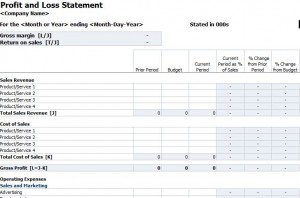
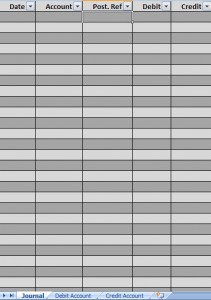
Screenshot of the Profit and Loss Template

Using the Profit and Loss Template

Using the profit and loss template is just as easy as setting it up. Simply start inputting various bits of information regarding sales, expenses, or other costs, and the template will begin to track everything you put in. Each of the categories that are available in the template is customizable so change them as you need to make them fit your business.

Once you have everything input into the template you will see a final calculated value for net profit or loss, it is as easy as that. Keeping the template updated with current information will make it easy to see what is happening at your company and since the template is so easy to use it’ll always be up to date.

No other profit and loss tracking system is as simple to use, simple to setup, or as cheap to obtain as this profit and loss template so why not give it a try today and see what your business could improve?

Download: Profit and Loss Template

If you enjoyed this post, make sure you
Subscribe to my RSS feed!


The Top 5 Excel Accounting Templates for Small Business Owners

Whether it’s a company of 50, five, or one, the typical small business entrepreneur tends to wear several hats during the initial start-up phase.

It’s the bi-product of an unfortunate catch-22 scenario. Although you need highly-skilled and individualized labor to aid in the business legwork, you can’t afford a payroll until your company starts raking in revenue. And not surprisingly, revenue is based off of financial maintenance, organization and planning – something reserved almost solely for an individual with extensive accounting expertise. In other words, a role for an experienced chief financial officer or in-house accountant.

But not surprisingly, a sizable majority of accounting-cowering business owners tend to divvy out their bookkeeping responsibilities during initial start-up phases to outside accounting firms. That outside accounting help tends to be one of the most common reasons for financial failure for most young businesses, according to a recent report by The New York Times.

In order to lay the foundation for a flourishing, profitable business, C.E.O.’s must first play the role of head accountant and C.F.O. as well.  Although it can be a  frustrating, sticky and time-consuming process for most novice business owners, self-accounting, bookkeeping and handwritten documenting will undoubtedly be worthwhile ventures for the financial fitness of your future company.

5 Premier Excel Accounting Templates to Streamline Your Business Venture

One of the most common misconceptions concerning accounting is that it’s an impossible feat to manage on an individual basis. Most novice business owners assume that financial streamlining is a task associated with increased labor, costly programs, or confusing tutorials. Rather, one of the simplest and most cost-effective methods accounting can be achieved through the Microsoft Excel program.

And with the right excel accounting templates, business owners can effectively leverage, record and plan for their future financial portfolios.  From general ledgers to income statements, here are our picks for the five very best excel accounting templates for entrepreneurs and business owners.

1. Daily Cash Transaction Report

Meticulous daily tracking is arguably one of the most crucial components to small business accounting. Although it tends to require the least amount of lingo and specialized skill, it can be one of the most time-consuming and overlooked financial processes for most beginning business owners.

With the Daily Cash Transaction Report, business owners can track total cash sales, bank transfers, cash inputs, payments, and several other monetary transactions. The template also contains a space for users to log specific notes.

Download: Daily Cash Transaction Report

2. General Ledger 

General ledgers are long-term financial maps for a company’s bookkeeping, and one of the most useful kinds of excel accounting templates a business owner can maintain. They can be used to plan financial statements, measure liabilities and equities, as well as help to pinpoint financial failures and successes.

With the General Ledger template, business owners can track the dates, descriptions and type of tender for their company’s long-term financial transactions.

Download: General Ledger

3. Sample General Ledger 

While the basic General Ledger contains an interchangeable outline for business owners to map their financial profiles, the Sample General Leger from ExcelTemplates.net provides a kind of comparative, sample-based general ledger for reference.

Using a sample general ledger can be especially useful for business owners that need a bit of guidance when it comes to their financial tracking. The spreadsheet contains room for various account names, as well as the type of tender used, and the initial and final balances.

Download: Sample General Leger

4. IRR Financial Calculator

I.R.R., an acronym for internal rate of return, can be a somewhat confusing concept for novice business owners to grasp. In specific terms, IRR stands for “internal rate of return”, another world for a complex calculation used to arrive at the simple rate of return for a financial portfolio.

But with the IRR Financial Calculator from ExcelTemplates.net, this intricate calculation can be completed with a few clicks of a mouse. The interchangeable calculator maneuvers itself based on individual data input, allowing business owners to quickly, and easily, assess rates of return.

Download: IRR Financial Calculator

5. Profit and Loss Projection

Profit and loss projections, another term for an income and expense statement, are invaluable tools for mapping future financial endeavors for a company.

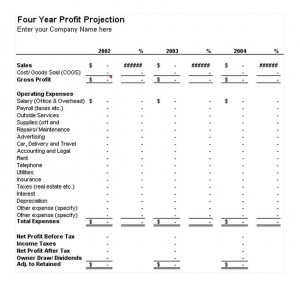
With the Profit and Loss Projection template, business owners can navigate and isolate specific costs pertaining to their business, as well as map the rate at which those costs might expand over the following year, or decrease. These expenses range anywhere from payroll and salary, to specific advertising and marketing costs a company might accrue.

Download: Profit and Loss Projection

If you enjoyed this post, make sure you
Subscribe to my RSS feed!


Price Elasticity of Demand Calculator

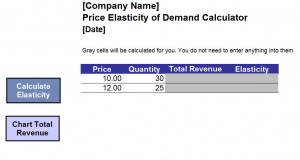
Doing business these days can be very rough. There is competition all over the place, and it’s only increasing. Because of this, an entrepreneur man is always looking for ways to increase profits while also keeping prices down. One of the ways an entrepreneur can help out his bottom line is by using a free price elasticity of demand calculator Excel template.

By using this free tool, a business person can look at the demand for products after price increases or decreases. This is one of the tools that can help a business thrive during both good and bad economic times.

Price Elasticity of Demand Calculator

Download: price-elasticity-of-demand-calculator-1

If you enjoyed this post, make sure you
Subscribe to my RSS feed!


Annual Projected Profit and Loss

[enlarge]

Running a business can be one of the most demanding things for anyone. When looking to run a business you will need to keep track of certain information. Some of this information is how much you are making and spending. As a result you will need to have an annual projected profit and loss forecast.

This can help you keep good track of your income and expenses and also allow you to figure out how much you will make over time. With Excel you can use a template to help you evaluate your business finances on a regular basis. By keeping track of your income and expenses you will always know how you are progressing.

The first part of the projected statement is income. This is recording the amount of money the company makes. When recording the income you will keep track of all of your sales and revenues. You will also keep track of costs of goods sold as well. Using the Excel template will give you a great tool to use when tracking your business income.

On this template you will usually record sales, revenues, costs of goods and this will allow you to figure out your gross profit. If you are looking to project profits and losses then going over income is the first thing you need to do with this template.

When using the Excel annual projected profit and loss template you will also need to keep track of the expenses over time. These are things such as rent, utilities, insurance and advertising.

It is important to go over these things so that you will know how much it will cost to run the business over time. Having the expenses recorded and estimated will give you the means to make reliable predictions on how much will be needed to keep the business in operation over time.

(more…)

If you enjoyed this post, make sure you
Subscribe to my RSS feed!


Budget Forecast

[enlarge]

This spreadsheet is a very handy P&L statement and budget forecast tool. It’s a great choice for compiling a one-year statement based on revenue, expenses, cost of services and taxes. Download the P&L statement here for free.

This statement will help large or small businesses determine where opportunities for profit exist as well as areas where expenses can be trimmed to maximize profitability. This forecast spreadsheet will make it a breeze to compile yearly profit and loss statements and provide a well-rounded picture of where your business or venture lies.

Features of this Template

This template makes it easy for virtually anyone to track and calculate expenses. That aspect makes it a top choice for new businesses owners who may not have extensive accounting experience. By simply filling in the applicable fields, you can create an easy-to-understand P&L statement and budget forecast.

Using your other financial reports can help make your profit and loss statement even more details, which can be an advantage if you plan on selling your business.

You’ll be able to compare profits against common expenses, such as advertising, marketing and direct sales efforts. You’ll also be able to take into account tax spending as well as costs associated with maintenance and repairs.

Why Download this Spreadsheet?

This spreadsheet can be used for any industry out there. Whether you are just starting your own small business or working with the finances of a multinational corporation – this is a great spreadsheet to use.

Our profit and loss calculator is one of our most popular spreadsheets for a good reason: it makes complex financial structures easy to understand to create a good framework for increasing profits.

Why choose ExcelTemplates.net?

We are a leading provider of templates for all areas of business and personal tasks. We strive to produce and offer templates that are easy to use, free and available instantly. There’s no reason to spend money or labor over creating a spreadsheet from scratch when you can have access to hundreds of useful solutions.

Download this profit calculator and you’ll be ready to start using it in seconds. You’ll see why we are on of the most popular and trusted sites for virtually any template you can think of.

(more…)

If you enjoyed this post, make sure you
Subscribe to my RSS feed!