Company Activities


Printable Employee Performance Review Forms

Regardless of the kind of vision you have projected for your company’s financial future success, it tends to be the people you employ who make the financial say in business success or failure.

But for every dozen incredibly skilled, highly-driven employee that walks through your business doors, there are a few cracked eggs that manage to seem to find their way into the carton. And when gone unchecked, left to fester in a pool of bad habits and dishonesty, those putrid eggs can infiltrate and poison their surroundings.

And when the time arrives for you to “weed out” the bad eggs, employee performance reviews play an integral role in maintaining a certain amount of business productivity. However, when managers and business owners come unprepared to employee performance reviews, all too often a familiar (but unfortunate) scene plays out:

Printable Employee Performance Review Forms from ExcelTemplates.net

Without the right questioning, concern or assessment, many bad habits can go unseen, allowing those habits a wide gateway for continuing to be problematic.

With ExcelTemplates.net’s Printable Employee Performance Review Forms, business owners can effectively – and concisely – manage individual employee performances, and gather an overarching picture of company strengths and weaknesses. You can get Printable Employee Performance Review Forms at no charge here.

Strategizing Business Success with Printable Employee Performance Review Forms

Employee performance reviews can be a stressful series of events, both for employees and employers.

Employees, placed under the hot seat, are praised, questioned and criticized from nearly every facet of their work. From honesty and dependability, to time management and productivity, employees are either given the green light for future projects, or instructed to alter their habits.

But for employers, this task tends to be equally as daunting. Performance reviews are synonymous with a certain amount of expectation, as managers are left with the difficult task of extracting bad habits from the workplace, and inserting newer, more productive tendencies.

With Printable Employee Performance Review Forms from ExcelTemplates.net, employers can effectively gage individual employee strengths and weaknesses through:

  • Honesty
  • Productivity
  • Technical Skills
  • Work Consistency
  • Enthusiasm
  • Cooperation
  • Attitude
  • Initiative

 Tips for Conducting a Successful Employee Performance Review

  1. Plan meetings in advance. Allow your employees ample time for reflection before they’re forced to sit in the hot seat.
  2. Ensure the reviews are a priority. Although an employee performance review might seem somewhat in vain, conducting these measures are crucial to your company’s financial success.

Download: Printable Employee Performance Review Forms

If you enjoyed this post, make sure you
Subscribe to my RSS feed!


Conference Room Scheduler

Schedules for employees in any profession or line of work seem to be more jam-packed than ever these days. The responsibilities get piled on and it’s easy to lose track of important dates or upcoming meetings. If you work in an office place that holds most of its meetings in conference rooms, a conference room scheduler can help ensure that everyone is kept in the loop.

These meetings can be critical to the long-term success of the company, so it’s important to have everyone who is scheduled to be there be in attendance. The conference room scheduler template can also help eliminate potential scheduling conflicts and help keep a better order of things down the road. The scheduler is printable, easy to fill out and use, and it’s 100% complimentary.

Using the Conference Room Scheduler

At the top of the conference room scheduler is a space reserved to notify employees of which conference room number the schedule corresponds to. There is also a slot for the week that all meetings will take place. These two spaces should leave no room for debate if an employee claims they were unaware of the location or the date of a scheduled meeting. It’s encouraged to post the schedule in a place or area where no employee can claim they didn’t see it.

screenshot of the conference room scheduler

As designed, the scheduler runs from 8:00 a.m. to 5:30 p.m., Monday through Friday. The days are also broken up into 30-minute intervals. In each interval is a space or block where you can mark if a meeting is scheduled to take place.

Because it’s an Excel template, it is completely customizable. You can add hours of the day or all seven days of the week is you so desire. You can also add your company’s logo or color scheme to the template to give it more of a professional feel.

The conference room scheduler is one of the many templates, calculators and spreadsheets available here that are designed to make life for companies, business owners and their employees easier.

Download: Conference Room Scheduler

If you enjoyed this post, make sure you
Subscribe to my RSS feed!


Employee Termination Checklist

Firing or terminating an employee is a difficult and delicate process that must be handled correctly to avoid any and all legal trouble. It is also important for a company to make sure everything is taken care of before letting the employee go, that is exactly what this employee termination checklist is for.

The checklist was made to be a simple guide so you know everything is taken care of and as long as you follow the process and check everything off you will know that everything was done right. The employee termination checklist is completely customizable, so when you are preparing to let an employee go your company can quickly add or remove any additional criteria they might need. It only takes a few seconds in Excel to add or remove categories too so there is basically no work involved.

Not only is the template customizable, it is completely free to download and use. That is right, there is no monetary investment required at all.

Employee Termination Checklist

Using the Microsoft Employee Termination Checklist

Using the employee termination checklist is incredibly easy as well. Once you open it up in Excel the checklist itself will be displayed. All you need to do is change, remove, or add any categories you might need and the checklist will be ready to use.

Obviously it will be much easier to actually use if you print it out and when you do need to use the checklist you simply need to check off each of the boxes that were required. The employee termination checklist makes it easy to track anything and everything that is done when an employee is terminated, and since it is a paper copy when you print it out it will be very easy to file away for future reference as well.

Overall, this Excel employee termination checklist is definitely the fastest, cheapest and easiest way to make sure you take care of everything when it comes to employee termination. If you are looking for a good way to make sure all of the necessary steps are taken then this is definitely the right Microsoft Excel spreadsheet template for you to use.

Download: Employee Termination Checklist

If you enjoyed this post, make sure you
Subscribe to my RSS feed!


New Hire Checklist

In today’s fast-paced way of life, finding suitable employment—or any for that matter—can be stressful. However, keeping the job and improving efficiency can be just as daunting as well. Why not make the struggle of life just a little bit easier? Easy is good. You like easy, don’t you? Of course you do! So why not download the new hire checklist to alleviate some of the stress that comes with the daily battles that you must face in the workforce?

Now, as you may very well know, easy comes with a price and that price is free! Yes, you can believe it my friend. This easy-to-use and completely customizable Excel file is one-hundred percent free, and can be downloaded here for free on this page.

Using the New Hire Checklist

Now that we have gotten that out of the way, it is time to show you just how easy the new hire checklist is to use with a few of these easy steps:

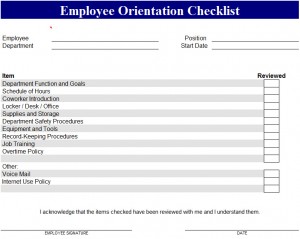
New Hire Checklist screenshot
  • Once the new hire checklist is downloaded and opened, simply fill in the easily customizable employee information, department, position, and start date.
  • Second, perform the basic employee tasks listed on the new hire checklist, and be sure the check off what has been reviewed and what has not—you want to improve your efficiency level, don’t you?
  • Next, and take note that this step is extremely crucial for top efficiency while using the new hire checklist, go back and check records and record-keeping procedures to make sure that they are up to par. Review check-out times, and review and possibly update things like Internet Use policies. Check off the review box for any of these and make any necessary notes for a later date to improve efficiency.
  • Finally, do not forget to sign and date the orientation on the blank space provided near the bottom of the page. Once this is finished, have your supervisor approve it and do the same.

Now wasn’t that easy? By downloading a simple little list, you were able to eliminate hours of hassle, weren’t you? Easy and free is the best kind of medicine, don’t you agree?

Download: New Hire Checklist

If you enjoyed this post, make sure you
Subscribe to my RSS feed!


New Employee Checklist

Whether it’s starting a new business or running one, a new employee checklist can be quite handy in order to get your new hires settled into their new jobs. These checklists are mostly used when a new employee is going through orientation or training.

Employers often need these to ensure if their employee is trained properly in the skills they need to get the job done. Employers must download as many of these as possible for future employee training purposes. These checklist templates are well organized for those who looking to save time from creating a list from scratch. Templates often are pre-created to give the checklists a professional look for employers.

Like all templates available, the new employee checklist is free to download. These free downloadable templates are often cost effective and are a great way for businesses to save money. Since the templates are pre-made, they can be customized with the use of Microsoft Excel.

New Employee Checklist screenshot

Customize information such as your company’s contact information, training tasks, and more. Once they are customized to your satisfaction, you can save them as a separate file. These checklists are easy to use and can be downloaded right here on our website. Once downloaded, these forms can be printed and customized as often as possible.

Using the New Employee Checklist

With a new employee checklist, you can also add some relevant information. Some of the information should include:

  • When the employee completed a specific training task. Often times, it’s best to keep track to see when and if they have completed a task. This checklist is a good reference to make sure if an employee is trained or not trained on specific job-related responsibilities.
  • Employers can use the checklist to add new tasks in the event of a new change in company policy or a new skill for the employee(s).
  • These checklists could come in handy in the event if an employee is promoted to a new position.

Like other important documents, always have electronic backups and paper copies. Employers of all kinds need things like this in order to keep their business more organized. You can download the new employee checklist template for free on this page.

Download: New Employee Checklist

If you enjoyed this post, make sure you
Subscribe to my RSS feed!